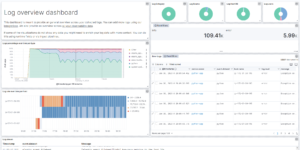
Squid Proxy Access Logs Dashboard

Visualize your Squid Proxy traffic with this dedicated Kibana dashboard.
Tailored for data ingested via Filebeat’s Squid module, it offers insights into:

  • Traffic Volume: Bytes sent/received over time.
  • Top Domains: Most visited websites and domains.
  • Response Codes: HTTP status code distribution (200, 403, 503, etc.).
  • Client Activity: Top source IPs and user agents.

Contents: NDJSON file containing the dashboard and visualizations.

Source: molu8bits/squid-filebeat-kibana

Tested versions
ECS compliant

You must log in to submit a review.

Related downloads

RUM extension dashboard

This dashboard provide deeper insight into the real user monitoring data collected by Elastic RUM.

Watch to detect large shards

This watch is getting data from the Elasticsearch shards API directly and checking for large shards.

Ask Me Anything Booth – Canvas Example

This is an example canvas page that shows how to visualize using canvas in general.

Elastic Stack Monitoring Dashboard

Kibana dashboards that is showing the monitoring data collected by Elastics in built monitoring capabilities.

Logstash Pipeline for Talend ESB & MDM

A Logstash Pipeline to collect json logs from Talend ESB & MDM.

These downloads could be also interesting for you

Filebeat Log analysis canvas example

This is a simple canvas dashboard example that analyzes logs created by Filebeat.

Vega advanced heat map

Vega example to show GitHub commits per author per hour of day.

Vega Compound Gauge

This is a compund gauge visualization made with Vega. Its very helpful for visualization of percentage values.

Logstash REST to exec scripts

Make Logstash a REST endpoint that executes scripts or manually adds data in Elasticsearch.

Playable Pacman

This is a playable version of pacman made with Vega.

Uptime watch using Heartbeat data

This watch checks the availability of your Heartbeat observed services. It will trigger an alert whenever at least one of your services is down.